Golf for gated communities
Golf tee sheet software for HOA and private golf communities.
Run your course on the same system as your gate. Members book from their phones under the rules of their membership, public golfers book on the course’s own page, the pro shop checks everyone in, and the guard at the gate sees every visiting golfer coming. Golf is an add-on we switch on for your community.
- Members, guests and the public on one sheet
- No marketplace
- A gate pass for every visiting golfer
One tee sheet for the whole course.
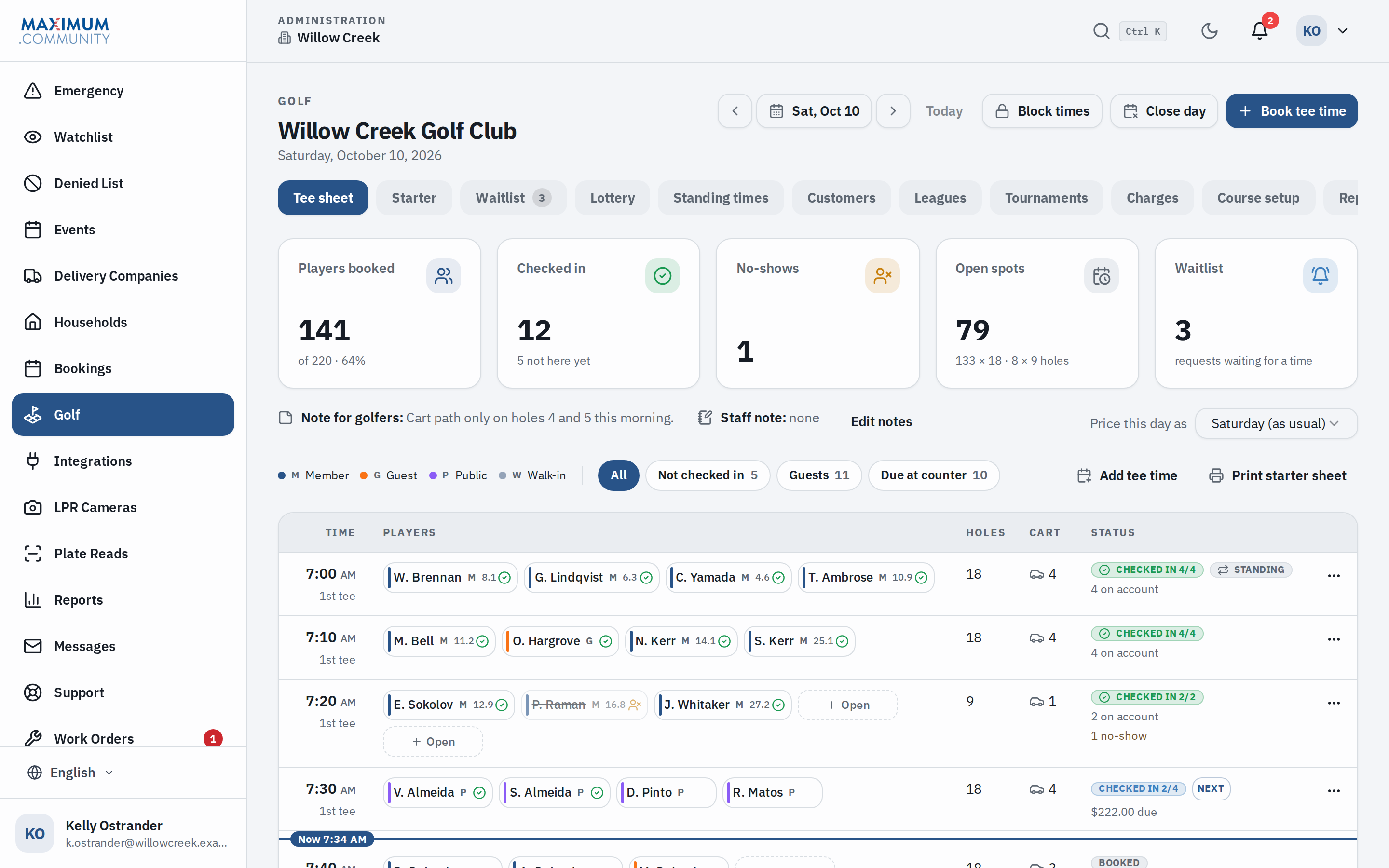
The pro shop, the office and the starter work from the same sheet. Every booking lands on it, whether a member made it on their phone, a public golfer on the course’s page or the pro shop over the phone.
Rules by membership
Each membership tier decides whether golf is included, how many days ahead a member can book and at what time a new day opens, the hours they may tee off, how many guests they bring and how many rounds they play in a week. The tee sheet applies it, so nobody at the desk has to remember it.
Phone bookings, from the same sheet
The pro shop books a caller from the tee sheet, moves a group, or adds a squeeze-in time. Rained out? Closing the day cancels its bookings with no fees or strikes and tells the players.
Blocks for the course and its events
Block tee times for maintenance or an outing. Leagues and tournaments place their own blocks on the days they play.
Who is playing, and how they pay
Every seat says whether it is a member, a member’s guest or a public golfer, and every group says what goes on account and what is due at the counter.
The starter’s desk.
Built for a tablet at the counter: who is due off next, who is here, and who still owes.
Scan and check in
Every booking has a QR code. The desk scans it with a camera or a USB scanner and checks the group in. A public golfer pays as they check in, and the desk records cash, a check or a card run on the course’s own machine.
Walk-ins
A walk-in goes into the next open time and is checked in, in one step.
No-shows
Mark a no-show and the seat opens again. Players nobody checked in or marked are listed afterwards, so the day gets closed out.
A login for the pro shop
Desk staff get a login that opens the tee sheet and the starter’s screen, with a printed starter sheet when you want one. Charges, reports and course setup stay with the golf managers.
Members book from their phone.
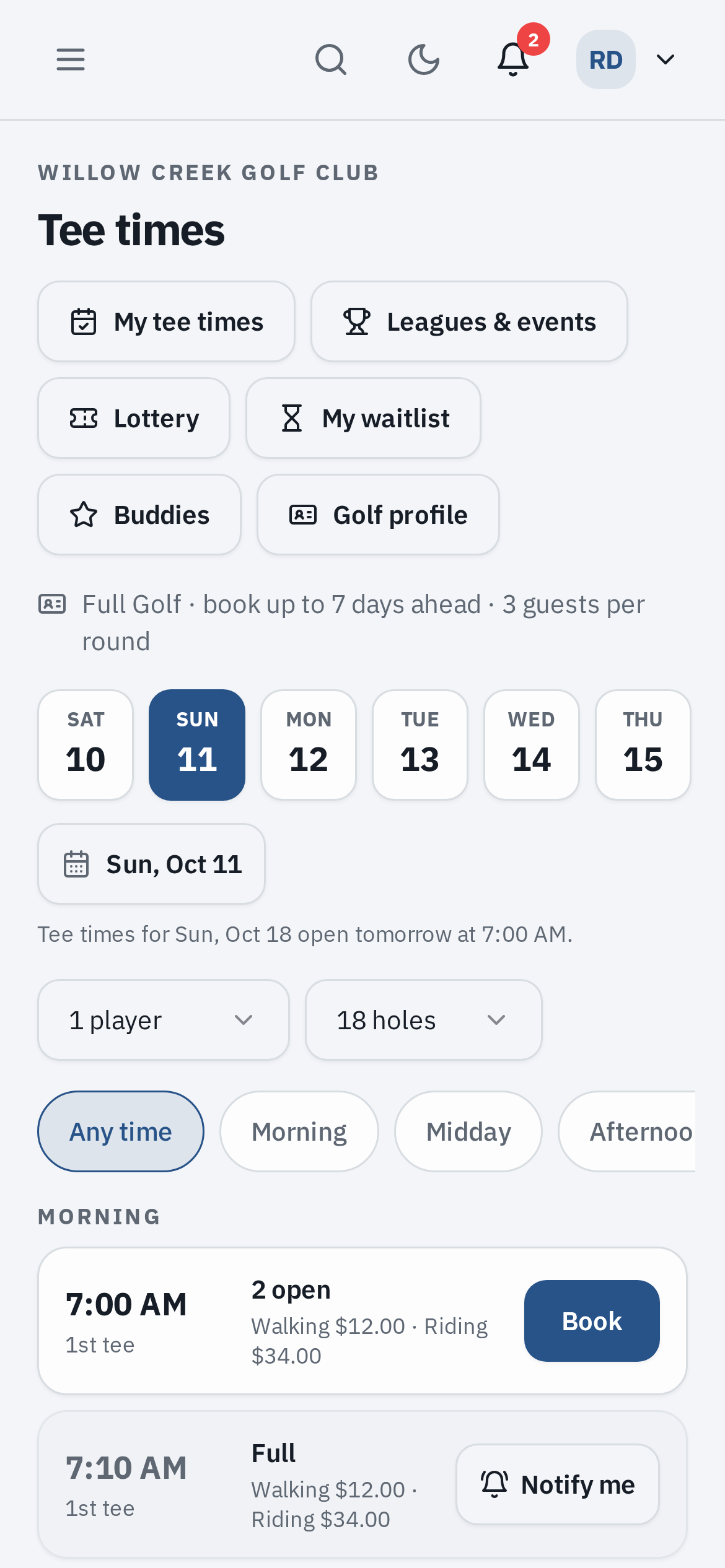
Golf sits in the same Maximum.Community app residents use for guest passes. A member picks a day, a time of day and how many are playing, and books.
Only the times their membership allows
A time a member cannot book stays on the list, greyed, with the reason in plain words.
The family, guests and buddies
They add people from their household, guests up to their tier’s allowance, and the buddies they have saved.
Notify me
A full tee time has a Notify me button. When a seat opens, the waitlist tells members before the public, and the first to book gets it.
In their calendar
Add to calendar works with Apple Calendar, Google Calendar and Outlook. The confirmation email carries a calendar invite that updates itself when the booking changes.
One code for the pro shop and the gate
Each booking has one QR code. The pro shop scans it to check the group in. When the booking brings guests, the guard can scan the same code at the gate.
Public golfers book on your course’s own page.
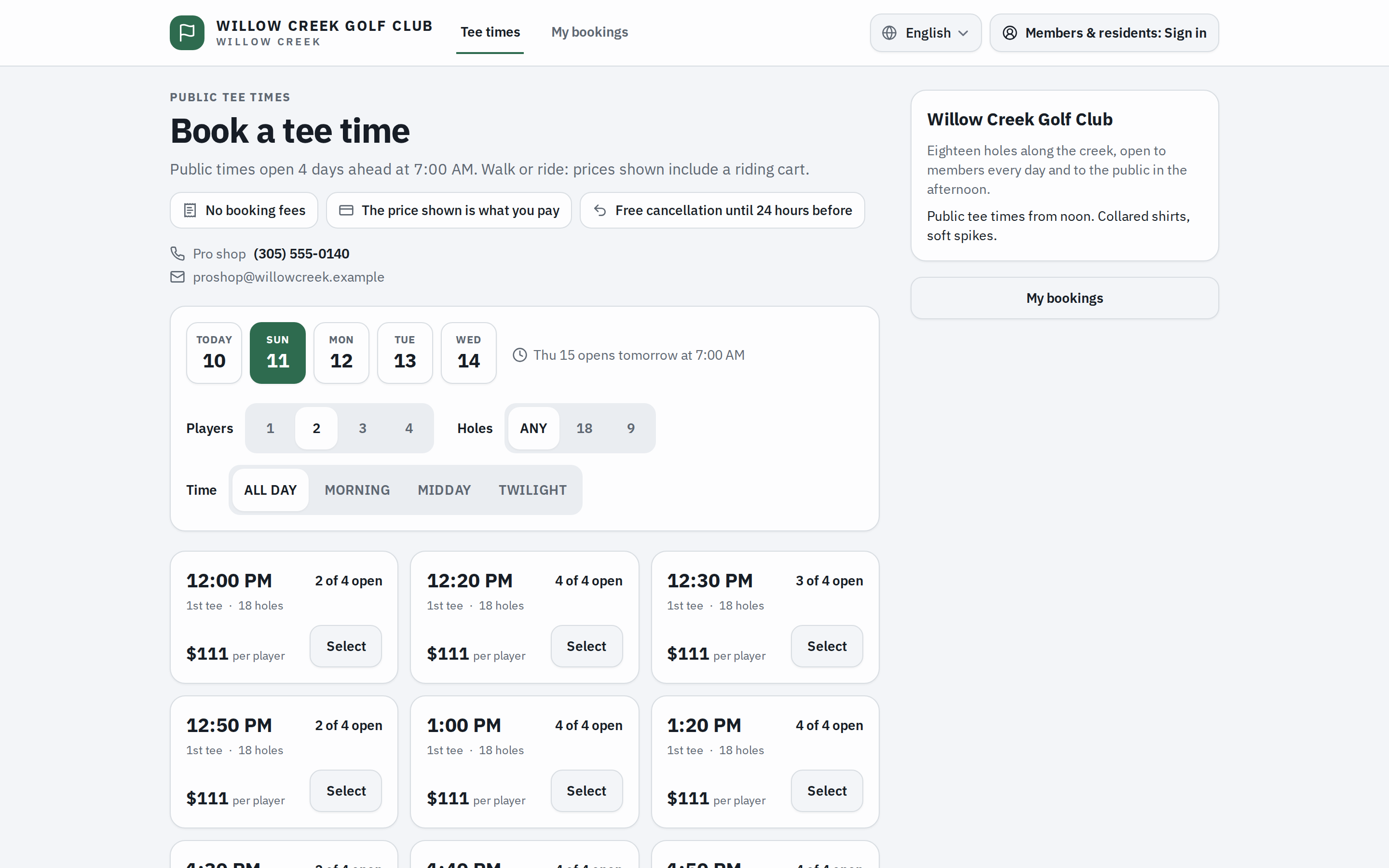
They pick a day, the number of players and a time, and see the price per player before they book.
The course’s own page
It carries the course’s name, its colors, its information and its rules. Link your website’s Book a tee time button straight to it. Your times are not listed on a marketplace.
No account to make
A public golfer confirms their email with a six-digit code. There is no password to forget.
Your limits
You decide how many days ahead public times open, at what time of day, and how many seats go online each day.
Get alerts
When nothing fits, a golfer asks to hear about the times they want, and gets an email when one opens.
Cancel from the email
The confirmation email has a link to cancel without signing in, and a calendar invite.
Golfers who never show
Past the number of no-shows you set, a public golfer is asked to call the pro shop instead of booking online.
Members sign in from the same page to book as members. If the office has put a member’s amenities on hold for unpaid dues, or removed their golf access, they cannot book on the public page either.
The guard knows who is coming to play.
A golfer who does not live here still comes in through your gate. The booking tells the gate before they arrive.
Step 1: Booked
A booking that brings a public golfer or a member’s guest gets a gate pass by itself. It goes on the guard’s expected list with the tee time, the lead golfer and the rest of the party.
Step 2: Screened
The golfers’ names and phones and the car are checked against the community’s deny list, the deny entries on its watchlist and the host’s own do-not-allow list. A match never cancels a booking: the office sees it flagged and the guard gets the warning.
Step 3: Admitted by the guard
The guard identifies the golfer and lets them in. A plate camera never opens the gate for a golf pass, and an unattended kiosk or call box will not take one.
Step 4: It follows the booking
Move the tee time and the pass moves with it. Cancel the booking, close the day or mark a no-show, and the pass is withdrawn.
Members come in the way they always have. The expected list is the one the guard works from all shift, whether the booth is staffed by our licensed security guards or by someone else. The guard’s screen in the booth
Busy mornings, given out fairly.
For the mornings everyone wants, a lottery replaces the race at the release minute. For the groups that play every week, a standing tee time.
The lottery
A window, not a race
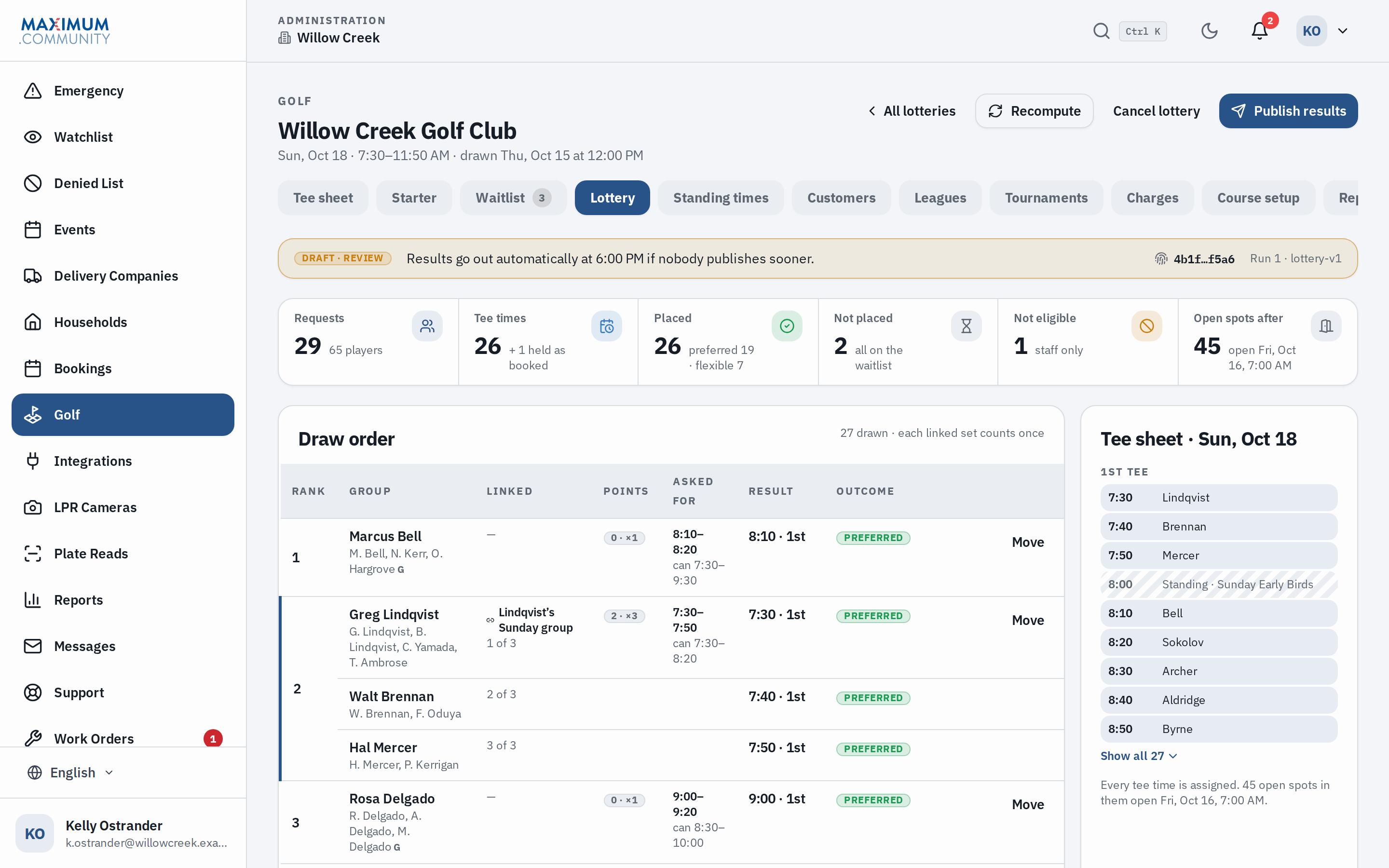
Instead of everyone refreshing at the release minute, members say when they would like to play and when they could, before a deadline.
A fair draw
Each request gets a ticket, plus one for every priority point. Members earn points when a draw does not give them their time. Groups who want to play together link their requests and get back-to-back times.
Looked over, then sent
A golf manager can look over the draw before the results go out at the time you set. Nobody can draw again. Requests that were not placed go on the waitlist, and members hear by email and in the app.
Checkable
When requests close, the draw’s fingerprint is shown. When the results go out, the secret number behind it is revealed, so anyone can check that the order was not changed.
Standing tee times
The Saturday group, every Saturday
A standing tee time books the same group every week. It is placed before members can book the day and before a lottery holds the morning, and it never moves anyone else’s booking.
Skip a week, end the season
The office skips a date or ends the series. A date that could not be placed in full is listed for the office to sort out.
On the screen in the clubhouse.
Any TV or monitor with a web browser becomes the board golfers look at when they walk in.
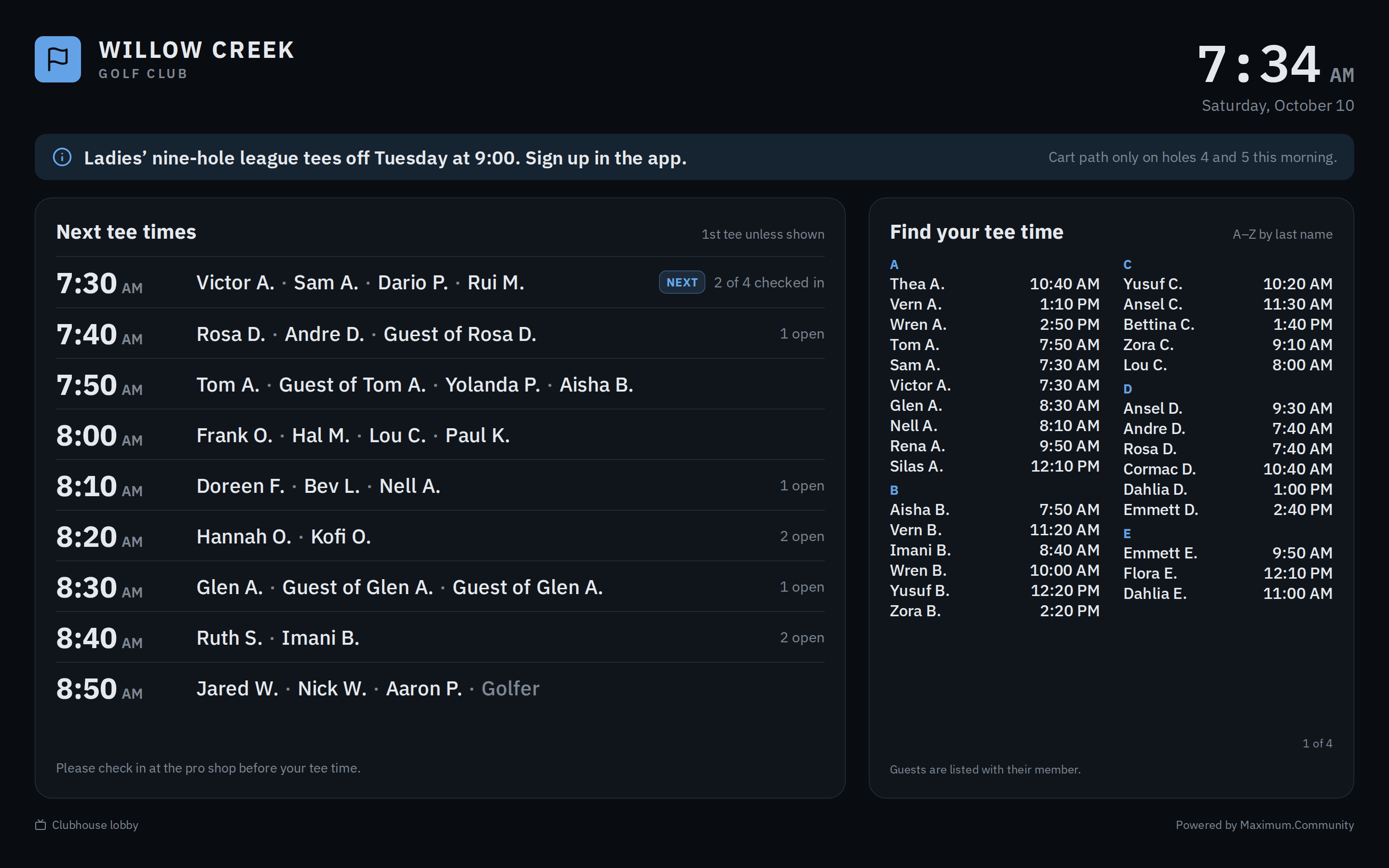
- The next tee times, who is checked in, and an A to Z list so golfers find their own time.
- By default, names are shortened on our server before they reach the screen, like “Rosa D.”, and anyone can choose to hide theirs.
- Nothing else about a golfer goes on the screen: no prices, no notes, no phone numbers.
- A message from the pro shop and the day’s note for golfers sit across the top.
Charges now, the bill later.
The tee sheet keeps the ledger. Nobody retypes a round into the billing system.
On account
Checking a member in posts the round to their household’s account. A guest’s round can go on the host’s account. Event entry fees post the same way.
One export for billing
The office exports the open charges in one batch, as CSV, Excel or PDF, with a total for each account by unit number so your management software can match them. An exported charge is never edited again; a correction is an adjustment.
Paid at the pro shop
Public golfers pay at the counter when they check in. The desk records the payment, and the day’s money is in the reports.
Leagues, tournaments and reports.
Set up a league that plays every week or a tournament that plays once. Members sign up in the app, with a waitlist when it fills and the entry fee on their account. Each round blocks its own tee times, or starts as a shotgun.
Pairings are drawn at random, by handicap or in sign-up order, and printed for the starter. Scores go in after play, and the leaderboard ranks them for stroke play, Stableford, scramble, best ball or match play.
The reports cover rounds, how full the tee sheet ran, revenue, no-shows and late cancellations, the waitlist, and leagues and tournaments, for any dates up to a year. Each one downloads as CSV, Excel or PDF.
How golf is switched on.
Golf is part of the free platform, and we switch it on for your community. It runs on the records the gate already keeps: your residents, their households and their membership tiers.
We set up the course with you: its tee times, its rates for members, guests and the public, its membership rules, and logins for the pro shop. The day it goes live, members find Golf in the web app and the pro shop opens the tee sheet. If golf is ever switched off, every booking and charge is kept.
Moving over from GolfNow.
One cutover, on an evening agreed in advance. Your golfers never see two tee sheets.
Step 1: Set up the course here
Tee times that match what you sell today, rates, membership rules and the pro shop’s logins. The public page stays off.
Step 2: Freeze GolfNow
On an agreed evening, GolfNow stops taking bookings. From then until the switch, nobody books anywhere.
Step 3: Import and check
Your customer list and future reservations come across from CSV files, after a dry run that writes nothing. Each day’s tee sheet is checked against GolfNow’s, player by player. Nobody gets a second confirmation, and visiting golfers get their gate passes.
Step 4: Switch
Your booking page goes live, your website’s button points to it, and GolfNow stops selling your times. There is never a day with two live tee sheets.
FAQ
Questions about golf.
Read next.
Visitor management
The platform golf runs on: guest passes, the gate log, amenities and reports.
Gatehouse software
The guard’s side of the expected list, shift by shift.
Guest passes
How a resident’s guest gets in, with a link and a QR code.
HOA boards
What the platform does for the board that runs the community.
Put your course on the same system as your gate.
Fifteen minutes on the phone covers your course, how members and the public book today, and who works the gate. Golf is an add-on we switch on for your community.