Guest passes for HOAs and gated communities
The HOA guest pass app your guests never have to install.
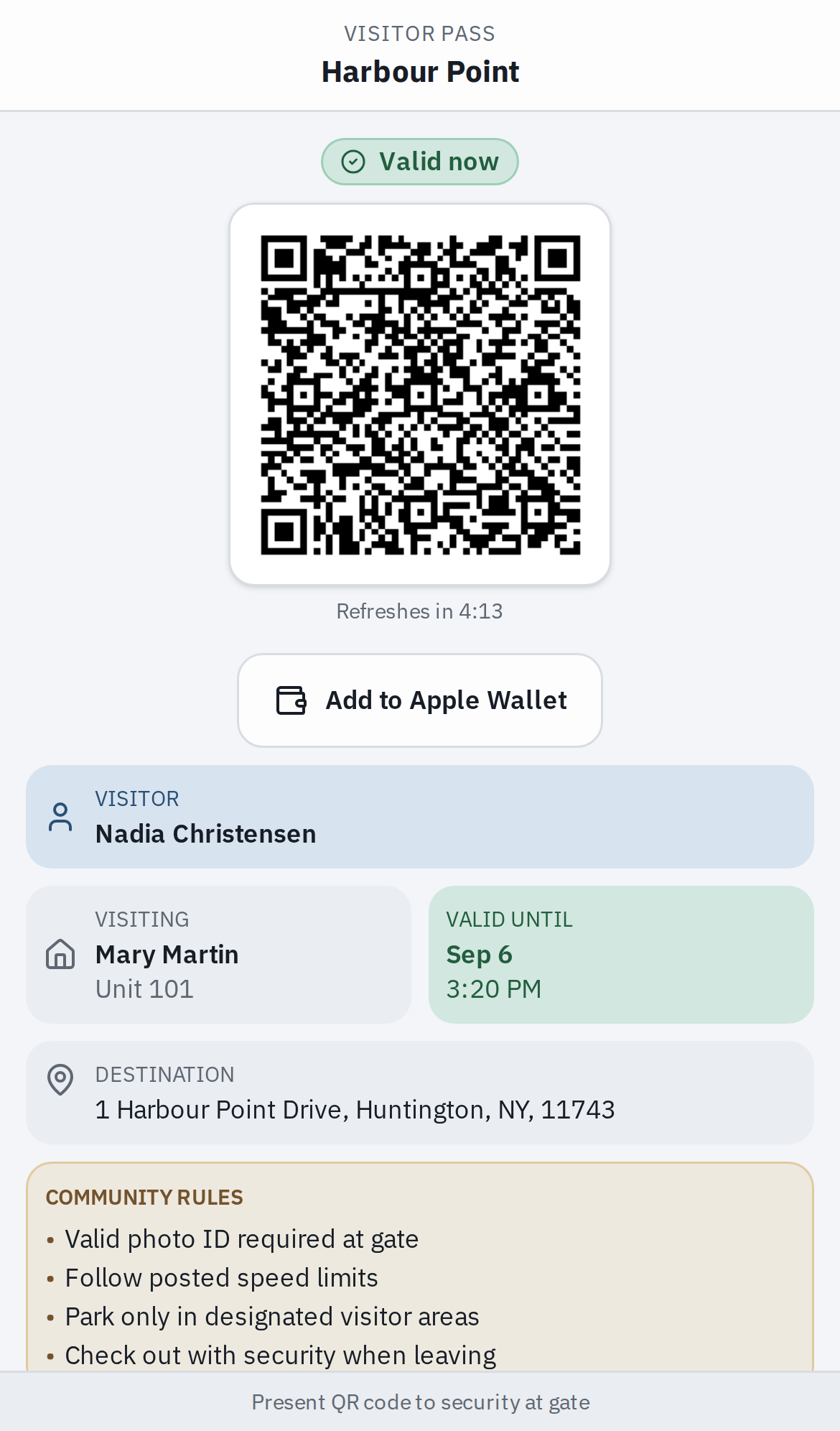
Maximum.Community is a free HOA guest pass app. A resident creates the pass and sends the guest a link. The guest needs no app and no account: the link opens a QR code that refreshes on a timer, and an iPhone can save the pass to Apple Wallet. At the gate, the guard or kiosk checks the live record.
- No app or account for the guest
- Apple Wallet card that updates
- Free for any community
What the resident sends.
A resident writes the pass from their phone before the guest leaves home. Nobody calls the booth from the highway. There are four kinds.
An expected guest
A name, and the plate and its state if they are driving. The link stops working when the resident says the visit ends, or a day after the pass was made if they leave that blank.
The weekly cleaner
In the iPhone and Android apps, now in testing, a resident sets it up once with the days and hours: Mondays 8 to 5 and Wednesdays 3 to 6 can be one pass. Outside those hours the guest’s screen says “not valid right now.”
A delivery or service call
One entry by default. Our kiosk accepts the pass once, and where plates open the gate, the plate opens it once. Neither works a second time.
A party
One pass for the whole guest list, with the number of guests the host allows. The guard checks names off as cars arrive and cannot check in more than that number.
The pass lives in the same record as the gate log, the deny lists and the rest of the free visitor management platform, so when the resident cancels the visit, it is canceled everywhere at once: the link, the Wallet card, the kiosk and the plate camera.
What the guest gets.
A message lands on the guest’s phone: a link from the resident. They tap it. That is the whole installation.
A QR code that refreshes
A countdown under the code shows when it changes next. A screenshot of it goes stale within minutes.
A six-digit code
To type at our entrance kiosk when scanning is not an option. It works on our kiosk, not on other keypads.
Add to Apple Wallet
On an iPhone, tap it, then Add on Apple’s sheet, and the pass is saved in Wallet.
Where they are going
The resident and unit they are visiting, when the pass ends, the address, and the community’s rules for visitors.
Whether it works right now
The page keeps asking while it is open, so a pass whose window opens at 9 a.m. turns valid on its own, and a canceled one stops.
On an Android phone the guest uses the same link. The code, the countdown and the six-digit code work the same way. The Wallet card is a convenience for iPhones, not a second kind of pass.
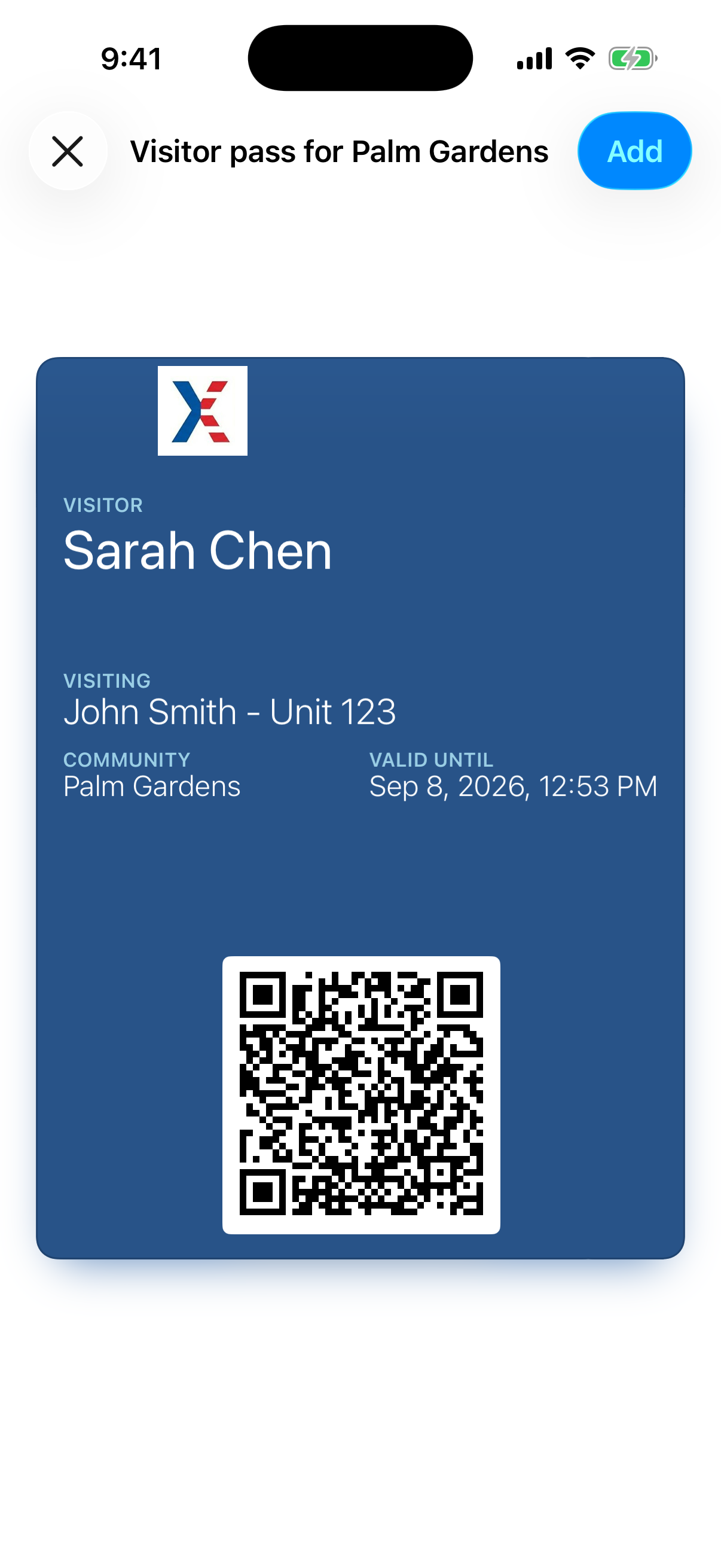
The card changes when the visit does.
The resident cancels Saturday’s dinner, and the card in the guest’s Wallet is marked void, with nothing for the guest to do. The card shows the guest’s name, who they are visiting, the community and when the pass ends.
Canceled
When the resident cancels the visit or switches the pass off, Wallet shows the card as void. A guest who checks before leaving can see that the visit is off. A pass the office switches off is refused when it is scanned, but the card is not updated.
Changed
In the iPhone and Android apps, now in testing, a resident can move the end time, change the window or the number of entries, or fix the guest’s name, and we tell Wallet the pass has changed. The phone fetches the new card by itself. No alert, nothing for the guest to do.
Never the key
An iPhone in Low Power Mode, or with automatic updates off for that pass, can fetch a change late. That is why the gate does not read the card’s word for it: every scan is checked against the live record.
On the lock screen, on the way in.
Near the community, the iPhone can bring the pass up on the lock screen by itself, the way a boarding pass appears at the airport.
Once the community’s location is on file, each pass carries it. When the guest’s iPhone is near it, iOS can show the card on the lock screen with a line saying to show the pass at the gate. Apple decides how near, and it wants the time to match as well as the place. Where the resident gave an arrival time, the card is timed to it. Without one, it is timed to when the pass was made, and may not come up on a later day.
The matching happens on the phone. The pass lists the place, and the iPhone compares it with its own position. We never receive the guest’s location, and we never ask for it.
At the gate, the live record decides.
The card and the link are copies. Whoever is on the gate asks the record, at that moment.
Step 1: The guard scans the live code
The answer comes from the record at that moment: valid, with the guest’s name and who they are visiting, or refused. In our guard app for iPhone and Android, now in testing, a refusal names the reason: expired, outside its days, used up, canceled, or a party that is full.
Step 2: A Wallet card is a name to check
The card names the guest but does not prove who is holding the phone. In our guard app, still in testing, the guard is asked to confirm who it is and can check the last four digits of the phone number the resident entered.
Step 3: An unattended kiosk wants the live pass
It accepts the live QR code from the link, or the six-digit code. Hold up the Wallet card and it tells the guest to see the guard, because nobody is there to check a face.
Step 4: The plate camera reads the car
The cameras we work with read the characters, not the state, so the pass carries both. Two live passes with the same number means the gate stays shut and the guard decides.
Where the board has turned on automatic opening for a gate, the car of a guest with an active pass can open it. Opening a gate from the platform, from the kiosk or a plate read, is the access control integration, rolling out by quote, one site at a time. How plate recognition works
The same check happens wherever the gate is worked from: the guard’s screen in the booth, the gate call box, or a licensed security guard at our monitoring center under remote guarding.
When this is the wrong pass.
It does not fit every gate. We would rather say so now.
Your guests mostly carry Android and want a wallet card.
We issue Apple Wallet cards only. Android guests use the link, which works the same way at the gate. Some guest pass products do issue both: Gate Sentry says its SentryPass is “saveable to Apple Wallet or Google Wallet.”
You want the Wallet card to open an unattended gate.
Ours will not, by design. A card that can be copied is a name to check, not a key. At an unattended gate the guest uses the live code from the link.
You want every pass texted at no cost.
Texts cost money to send and carriers require each sender to be registered, so SMS is charged if your community switches it on. Email is free, and a resident can send the link from their own phone in any messaging app.
You want passes going out this afternoon.
Nobody opens a community from a web form. We verify the board and the property before a single pass is issued, then set the community up with you.
Source: Gate Sentry product page (gatesentry.com, checked September 30, 2026). If it is out of date, email [email protected] and we will correct it.
FAQ
Questions about guest passes.
Let the guest list travel with the guest.
Fifteen minutes on the phone covers your gates, who works them, and how a guest gets in today. We verify the board, set the community up and bring the residents on. The platform costs nothing.